 Game Save Genie
The problem
If you play outside Steam, nothing is protecting your saves
One corrupted file, one Windows reinstall, one “wait, which PC did I play on last?” and dozens of hours are gone. Paid save-sync services cap your history at a couple of backups and delete everything when you stop paying.
Game Save Genie runs quietly in the background and gives those games what the launchers give theirs. Steam, Epic and Xbox titles are detected and skipped automatically, because they already sync their own saves.
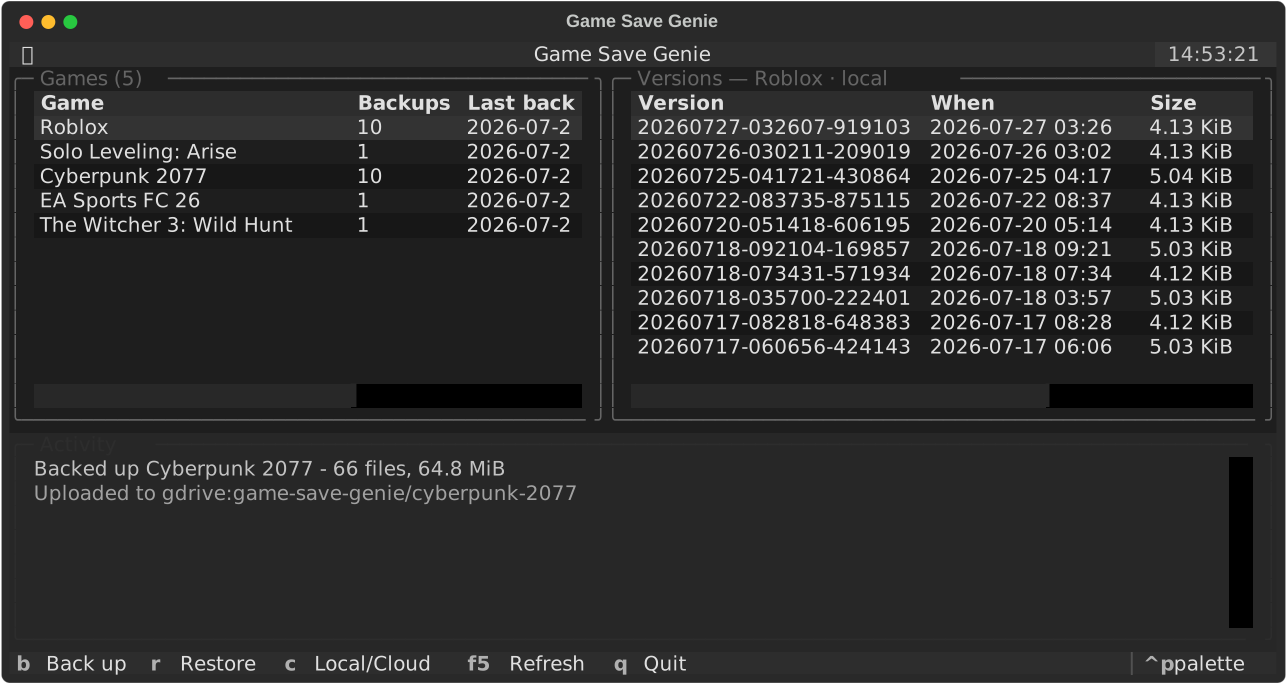
gsg. Arrow to a version, press r to restore. No ids to copy.
Setup
Three steps, then forget it exists
Install
Grab the installer, or the portable gsg.exe. Ludusavi and rclone are
downloaded automatically the first time they're needed.
Connect your cloud
Run gsg. Google Drive and OneDrive open a browser. Sign in and click
Allow. For any S3 bucket or your own server, run gsg setup-s3
instead.
Play
gsg auto starts at logon and watches for games. Backups happen when a
game closes and every 10 minutes while it runs.
What it does
Built to be boring, in the good way
Knows your games
Save locations for 19,000+ titles via the open-source Ludusavi database, plus process watching so it knows when you're actually playing.
Emulators too
gsg add --path backs up any folder (RetroArch, PCSX2, Dolphin,
memory cards, save states), so games Ludusavi doesn't know are covered.
Every session is a version
Immutable, checksummed snapshots. Roll back to any recent session, not just to
“last backup”. The last 10 are kept by default; raise it with
max_versions.
Your own cloud
Google Drive, OneDrive, any S3 bucket, or anything rclone speaks. Delta uploads mean an unchanged 40 MB save is never re-sent.
Follows you between PCs
Restore on any machine, with paths remapped automatically when a save was recorded under a different Windows username.
Tells you when it breaks
A tray icon shows at a glance whether your saves are safe, and goes red with a notification if a backup or upload fails.
Safety
Why you can point it at your save files
A backup tool that corrupts a save is worse than no backup tool. These rules are enforced in shared code, so every command and the dashboard all obey them.
- Verify firstDownloads are integrity-checked and staged before anything on disk changes. A bad download changes nothing.
- Safety backup alwaysYour current saves are snapshotted before every restore, and the restore aborts if that snapshot fails.
- Strictly newer onlyA restore happens only when the cloud is ahead of everything this machine has seen. Played offline? Your progress wins.
- Never under a live gameIf the game is running, you get a notification instead of a mid-session overwrite.
- Usernames remappedSaves recorded under
C:\Users\alice\…restore correctly forbob.
Alternatives
How it compares
| Game Save Genie | Ludusavi | Game Backup Monitor | Hydra Cloud | |
|---|---|---|---|---|
| Auto-backup on game close | Yes | No | Yes | Yes |
| Periodic backup during play | Yes | No | Yes | No |
| Direct cloud upload, delta | Yes | Yes | Needs a sync folder | Their servers |
| Cross-machine path remapping | Yes | No | No | Yes |
| Version history | Per session, 10 kept | Yes | Yes | 2 per game |
| Storage you own | Yes | Yes | Sync folder | Their servers |
| Free | Yes | Yes | Yes | Subscription |
Game Backup Monitor is a good tool that also auto-backs-up and auto-restores. Its difference is cloud: “cloud” there means pointing backups at a separate folder-sync client. Ludusavi is an excellent backup engine, and Game Save Genie is built on it. Hydra Cloud caps each backup at 500 MB and deletes saves 7 days after a subscription ends. Comparison reflects mid-2026, so check each project for current features.
Get it
Install
Windows installer
Per-user, no admin. Adds gsg to your terminal and a Start Menu entry.
Removes itself cleanly.
From source
Python 3.10+, Windows or Linux.
pip install git+https://github.com/Vasanthdev2004/Game-Save-GenieEveryday commands
gsg                  # the dashboard: browse versions, restore
gsg auto --install   # start at logon, hidden, with a tray icon

gsg status           # per-game overview and storage
gsg backup           # back up now
gsg pull --all       # catch this machine up from the cloud
Status: single-machine backup on Windows is stable and used daily. Cross-machine sync and Linux/Steam Deck support are beta. Solid in testing, but not yet battle-tested across many setups. Keep a second copy of anything precious for now, and please file an issue with anything you hit.
Questions
FAQ
Where do my saves actually live?
In storage you own. On your PC, every version is a plain zip of a Ludusavi backup tree you can open with anything. In the cloud they're stored de-duplicated: each file's contents once under its SHA-256, plus a readable JSON manifest per version. That is how an unchanged 40 MB save avoids being re-uploaded.
No accounts, no servers of ours, no telemetry: gsg only ever talks to
the remote you configured and to GitHub, to download Ludusavi and rclone.
What happens if I stop using it?
Nothing expires and there's no subscription to lapse. Your local snapshots are
plain zips of a Ludusavi backup tree, so Ludusavi can restore them directly without
gsg involved at all.
The cloud copy is content-addressed, so rebuilding it by hand means following a manifest, which is plain JSON listing each file's path and hash. It's MIT-licensed and runs on your own storage, so there's no vendor here to cut you off.
Does it interfere with Steam or Epic?
No. Games belonging to Steam, Epic and Xbox are detected and skipped, because those launchers already sync their own saves. It only handles what nothing else is covering.
Can I self-host the storage?
Yes. There's a docker compose up save server that works with any
S3-compatible store (MinIO, Garage, TrueNAS) with per-friend accounts, so your
saves never leave your network.
Linux or Steam Deck?
Beta, and testers are genuinely valuable. The full pipeline runs on Linux, with a
systemd user service, notify-send notifications, and Steam detection
across native, Deck and Flatpak paths. What it needs now is real-world mileage.